
How to Write a Remote-Friendly Resume
June 9, 2026
Remote jobs are very competitive. Postings can get over 250 applications in the first week. Because recruiters spend only about 7 seconds during the initial screen of a resume, they should be able to tell within seconds what you do, what tools you use, and whether you have the independence, communication skills, and structure needed to work remotely.
Here’s how to structure your resume to pass ATS filters and grab the hiring manager's attention.
Distributed teams operate across multiple time zones, meaning traditional workplace supervision doesn't exist. Employers are looking for self-direction and time management that not everyone has, so prior remote experience is a big advantage.
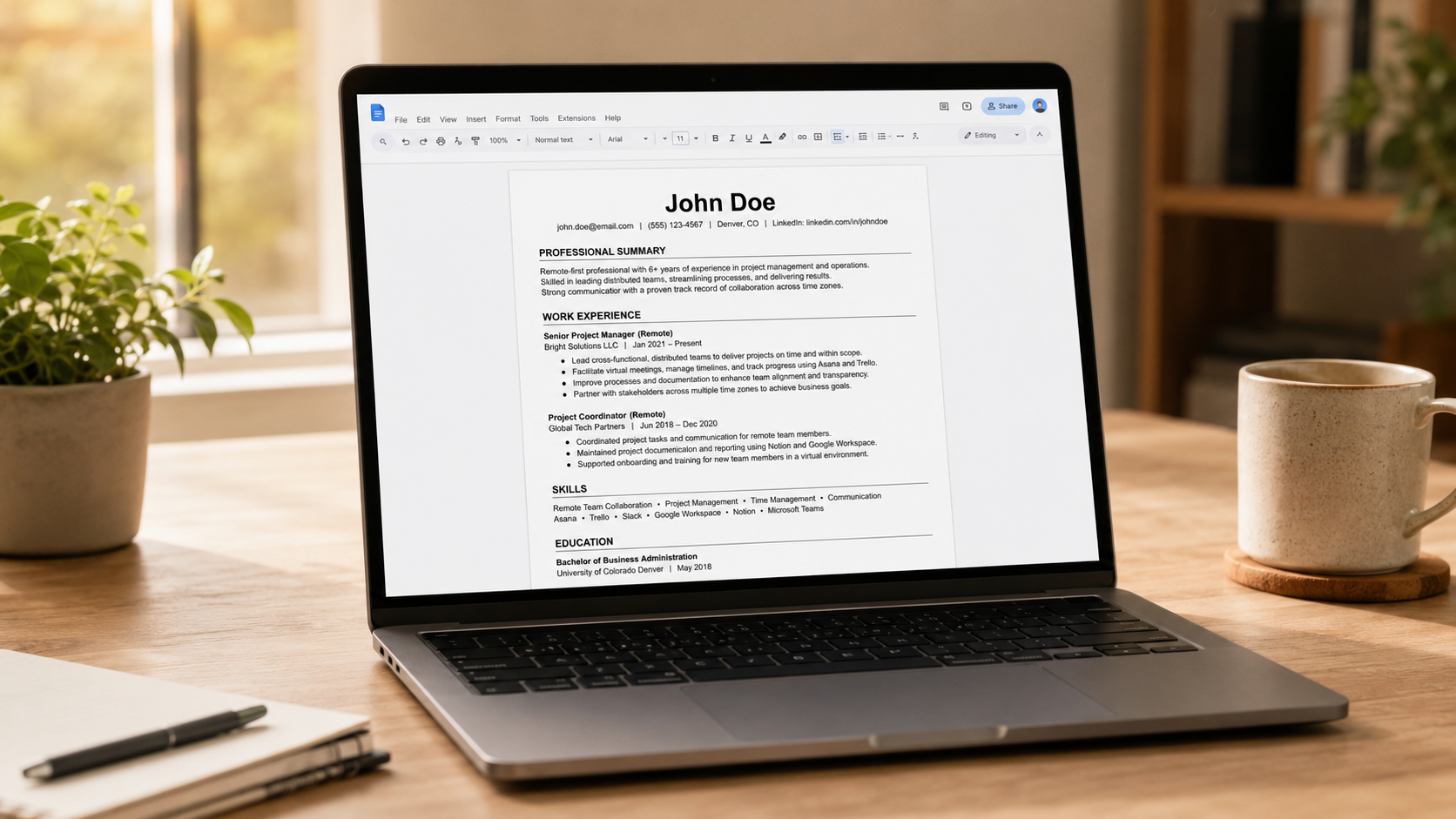
Make your remote background stand out. Label relevant positions with "(Remote)" or “(Hybrid)” right next to the job title so the recruiter doesn't have to guess.
Chances are, you already have skills that apply to remote work - you just need to frame them the right way.
Think about situations where you worked with people in different locations, managed long-distance clients, or coordinated across time zones. These are examples of distributed team experience, and they belong on your resume. Freelance gigs, volunteer projects, or even self-paced certifications also highlight the self-motivation that remote employers value most.
The ATS comes first. It stores, scans, and ranks your resume before a human ever gets involved. To ensure the computer doesn't scramble your information, stick to these safe formatting rules:
Skip the generic "hardworking professional" intro. Use your summary to explicitly call out your remote experience, time zones, and core tools.
Instead of listing "computer skills," create a dedicated core skills section broken down by the specific software remote companies use. For example: Documentation: Notion, Confluence, Google Docs, GitBook. Design & Development: Figma, Miro, GitHub, GitLab, Docker
The most effective approach is a reverse-chronological format that highlights your remote-readiness. Hiring managers cannot observe your daily work habits in person, so measurable outcomes help show that you can be trusted to deliver without constant supervision. Transform your passive duties into active achievements using this formula:
$$\text{[Remote Context]} + \text{[Action Verb]} + \text{[What You Did]} + \text{[Measurable Result]}$$
Example 1:
Example 2:
Example 3:
(If you don’t have the exact number, avoid guessing percentages unless you can explain how you accurately estimated them).
One resume won't cut it. You should create a different one for each job you apply to, where you mirror the exact language used in each specific job posting. This will help you clear both the ATS filters and the hiring manager’s initial glance. But don’t overdo it. You should only use the keywords that accurately match your experience.
Tailoring isn't just about hacking the system; it’s about speaking the company’s internal language. If a job listing repeatedly mentions collaboration within a "distributed team," using the phrase "remote team" on your resume can actually work against you. The automated system is looking for direct text matches, and the human recruiter is looking for someone who already fits their cultural vocabulary.
Check at the example below to see how a generic resume bullet point can be transformed to match a real-world remote job description:
The Job Description Snippet: "Looking for a self-starter comfortable with asynchronous workflows, managing deliverables across multiple time zones, and maintaining centralized team documentation in Notion."
The fastest way to pinpoint ATS-friendly keywords is by using a job description keyword scanner. These tools scan job listings and identify the key skills and qualifications you might be missing.
If you prefer a manual approach, here's a simple method:
Proofread! Seriously. Typos and messy formatting can be major red flags for remote hiring managers. Since strong written communication is one of the most sought-after skills for remote roles, your resume must reflect that.
If you're looking for verified remote opportunities, Remote Work USA can help with that. We feature listings across industries such as Engineering, Marketing, and Design, and send a weekly newsletter with the latest jobs: https://remoteworkusa.com/subscribe-to-the-newsletter

Don't miss out on new remote work opportunities. Subscribe to our weekly newsletter.